Convert all pages or a range
Process the whole document or enter page ranges such as 1–3, 5, and 8–10 when you only need part of a PDF.
 PDF to Word
Private, on-device conversion
Turn a PDF into an editable DOCX document directly on your Android device. Choose the pages you need, preview the result, then save or share it.
Built for practical document work
PDF to Word combines local PDF reading, text recognition, document reconstruction, and a clean Android workflow without accounts, ads, or unnecessary permissions.
Process the whole document or enter page ranges such as 1–3, 5, and 8–10 when you only need part of a PDF.
On-device OCR can recognize text from supported scanned PDFs and rebuild it into an editable document.
The converter reconstructs text, page breaks, detected layout, and supported images to create a practical DOCX result.
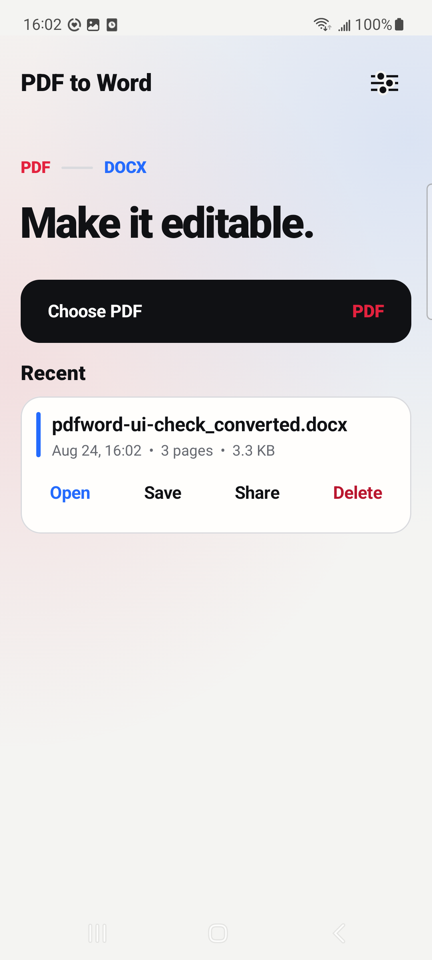
Review a document preview, save a copy to a location you choose, open it in a compatible app, or share it with another app.
Generated documents and previews can stay in the app's private storage until you delete them from your history.
The app includes English, Simplified Chinese, Traditional Chinese, French, German, Japanese, and Korean interfaces.
Simple by design
Select a PDF through Android's system document picker. The app receives access only to the file you choose.
Convert every page or enter a smaller page range, then let the app process the file on your device.
Preview the output, save a copy, open it in a compatible document app, or share it where you need it.
Privacy without extra steps
The current Android app does not request Internet access. Conversion, OCR, and preview generation happen on your device.
Read the Privacy PolicyQuestions
No. The current Android app processes selected PDFs locally and does not request the Android Internet permission.
PDF and DOCX use different layout models. Results can vary with complex designs, unusual fonts, damaged files, or low-quality scans, so reviewing the converted document is recommended.
No. Remove the password in a trusted tool before selecting the file in PDF to Word.
Recent DOCX files and preview images are kept in the app's private storage until you delete them. You can also save a copy to a location you choose.